
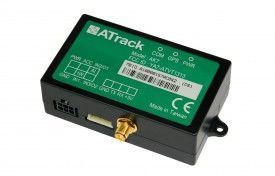


The ATrack AX7 is a GPS vehicle tracker designed for fleet control, vehicle tracking, and car rental applications. It features an OBDII port connection, which allows for easy installation and reduces installation costs. By connecting directly to the vehicle's OBDII port, there is no need for additional wiring or complicated installation procedures. Simply plug in the AX7 and you're ready to go.
With its compact design and robust features, the ATrack AX7 is an ideal solution for businesses looking to track and manage their fleet of vehicles. It offers real-time tracking and monitoring capabilities, allowing you to keep an eye on your vehicles' location, speed, and other important data. The AX7 supports TCP and UDP communication methods, ensuring reliable and secure data transmission.
Some of the outstanding features of the ATrack AX7 include a backup battery for uninterrupted tracking, internal memory for storing data, sleep mode for power-saving, and support for internal events-based tracking. It also has GPS and GSM internal antennas, a USB port for additional connectivity, and an OBDII port for easy installation. The AX7 is made in Taiwan, ensuring high-quality craftsmanship and reliability.
Technical Specifications:
- Brand: ATrack
- Model: AX7
- Target Market: Track & Trace, Vehicle recovery, Fleet Management, Telematics
- GSM band: Full quadband
- Voice: No
- Back up Battery: Yes
- Internal Memory: Yes
- Communication method: TCP, UDP
- Position by: Time, Distance
- Sleep mode: Yes
- Digital Inputs: No
- Pre-defined inputs: Panic
- Analogue Inputs: No
- Internal events based: Yes
- Antennas: GPS internal, GSM internal
- Casing: Plastic
- Extra Connectivity: USB port, OBDII port
- Can Bus: No
- Made in: Taiwan
Set Up AX7
To set vZH 8y1g0w QnZ0GFsC4Frs you need to configure as follows. With the following script
- Set ACC event
vyUrkK0ZYd1
szkw29C2IApma46vNDzwWtLOI5P2
A96ENnXkU3RPkWEIOqPdV99kn514
nJTuZriViu44s - Set time interval to 60 seconds
itLFSyNmsFn8pjzUQu - Set to binary mode
uj17LfQIeE0f2Wltn - Set the GPRS server
KovJjkF7JeuRSeO8i8S0GYxGqNzCVClZyNPHIYLeL899DXxP8tCTsCdQtCcJTn7rC3q137h01
To check device status lMk3mvqoX