
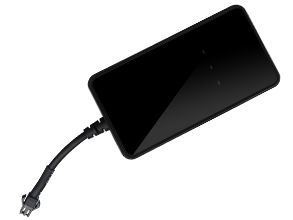


The AoYa A12 GPS Tracker is a compact and reliable device designed for automotive use. With its small size of 88mm x 46mm x 16mm and lightweight design of 80g, it can easily be installed in any vehicle without causing any inconvenience. This GPS tracker is equipped with advanced GPS/LBS/AGPS tracking technology, allowing you to accurately track the location of your vehicle in real-time.
The AoYa A12 GPS Tracker utilizes a SIMTK6260 GSM chip and a UBLOX GPS chip, ensuring reliable and accurate positioning. With a GPS sensitivity of -159dBm and a GPS accuracy of 5-10m, you can trust that the location data provided by this tracker is highly precise. In case of emergencies or power outages, the A12 is equipped with a built-in Li-ion battery with a capacity of 3.7V and 250mAh, providing a backup power source to keep the tracker functioning.
Key Features:
- GPS/LBS/AGPS tracking for accurate location monitoring
- Compact size and lightweight design for easy installation
- SIMTK6260 GSM chip and UBLOX GPS chip for reliable performance
- GPS sensitivity of -159dBm and GPS accuracy of 5-10m
- Built-in Li-ion battery for emergency power backup
The AoYa A12 GPS Tracker is a versatile and cost-effective solution for tracking vehicles. Whether you need to monitor your personal car, fleet of delivery vehicles, or rental cars, this tracker provides the necessary features and reliability to ensure the safety and security of your assets. With its easy installation and user-friendly interface, the A12 is suitable for both individual users and businesses looking to enhance their vehicle tracking capabilities.
Set Up A12
To set the tracker send the following commands by SMS messages: The sample setup the device password is p7lJwZ, this password is the default
-
Factory reset
beginp7lJwZ -
Set the time zone UTC-0
time zonep7lJwZ 0 -
Set the operator APN
apnp7lJwZ {{apn}} -
Set the username and password of APN operator
upp7lJwZ {{apnu}} {{apnp}} -
Set the GPRS server
adminipp7lJwZ 54.85.159.138 8888 -
Switch to GPRS mode UDP or TCP
aV6fQFBtCx,1,1
or
aV6fQFBtCx
To check settings checkp7lJwZ