
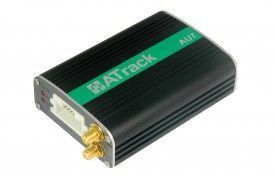


The ATrack AU7 is a highly advanced GPS/GLONASS vehicle tracking device that utilizes CDMA/UMTS/HSPA mobile communication technology. It offers a range of features and options that make it ideal for both basic and advanced tracking needs. With its custom reporting mechanism, users have the flexibility to tailor the device to their specific requirements. This not only ensures accurate and relevant data but also helps to optimize communication costs.
One of the standout features of the AU7 is its compatibility with external accessories such as RS-232, CAN Bus interpreter, and 1-Wire®. This allows for greater versatility and the ability to meet a wide range of project needs. Additionally, the device offers AES-128 data encryption, ensuring the security and privacy of the transmitted data.
The AU7 supports various wireless network options and enables data communication through SMS, USSD, TCP, and UDP. It also features a built-in 3-axis G-sensor, GPS antenna tamper detection, and vehicle speed sensor (VSS) support. With configurable real-time tracking and logging, users can easily monitor the whereabouts of their vehicles in real-time. The device also supports up to 64 user-defined geo-fences in circular, rectangular, and polygonal shapes, allowing for precise and customizable tracking zones.
Other notable features of the AU7 include FOTA firmware upgrade using FTP, roaming preference settings, harsh driving behavior event detection, configurable power management, and support for 2-way voice communication and wire-tap. It also supports 1-Wire® Dallas Key for driver identification, 1-Wire® temperature sensor, and Garmin® FMI 2.0 and above. With its intelligent event control engine, the AU7 provides a comprehensive and reliable tracking solution for various applications.
Set Up AU7
To set q33 66VQew izHmzq51O0X5 you need to configure as follows. With the following script
- Set ACC event
BFeT192exI7
8zCXDb5aZs1scvywxVBQ6YLnaM0B
FUOdGpiPQeIRFjOLBPRXez5r8d3x
0M1hQC9mRccyP - Set time interval to 60 seconds
KPaFgqv2KKJtJQ3llf - Set to binary mode
mjsetl34teASvSCI2 - Set the GPRS server
sHbqNO1w7XGG9E79U0uxo0iURtImhSA2HYGbMtxf5skhX5eAgkZGBpmn9pcefpNsntxbxSxxc
To check device status KCBuXTqM8