
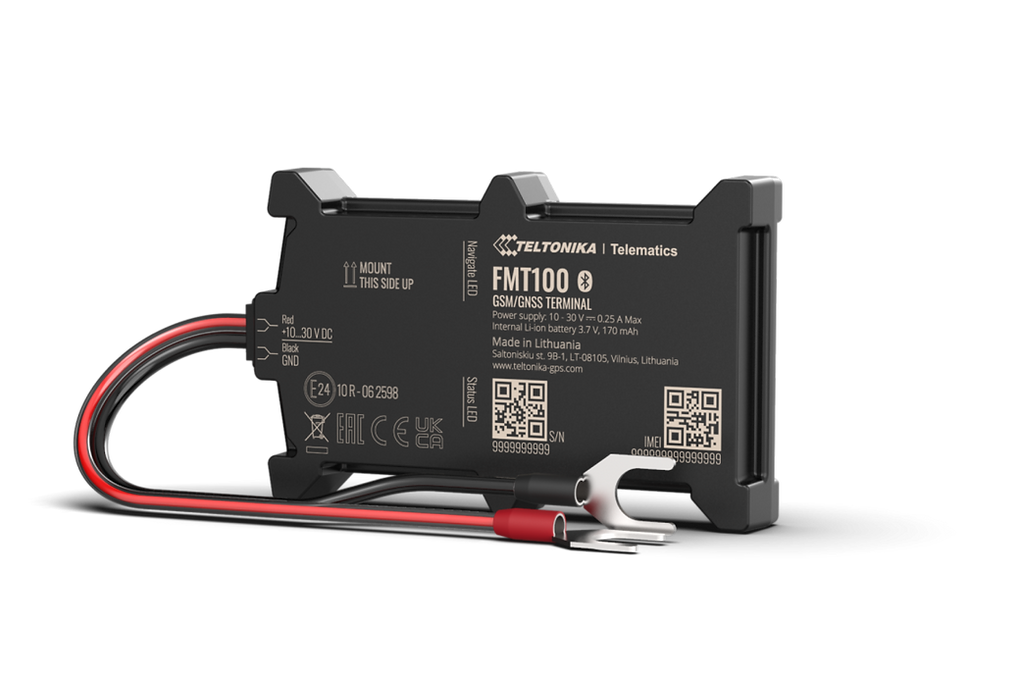


The FMT100 is a compact, Net Domain Technologies compatible GPS tracker designed for fast, reliable battery-mounted installation in vehicles and mobile assets. Built with an IP65-rated, water-resistant casing and a rugged design, the FMT100 is optimized for fleet rollouts, seasonal vehicle use, and rapid deployments where simple installation and dependable location and event reporting are priorities.
The device pairs Bluetooth® LE sensor support and a built-in 3‑axis accelerometer with quad-band 2G (GSM) connectivity, delivering crash trace details, event-driven alerts, and BLE-based environmental monitoring. Teltonika offers multiple bundle and order-code options for different installation kits; note that the product page includes End of Life (EOL) information, so check Teltonika’s support pages for current availability or recommended replacements.
Key Highlights
- Net Domain Technologies compatible: integrates into Net Domain Technologies for centralized real-time tracking, alerts and reporting across mixed fleets.
- Rapid battery-mounted installation: designed to mount directly to a vehicle battery with optional clamp cable bundles for five-minute installs.
- Rugged and water-resistant: IP65-rated enclosure protects electronics for reliable field operation in varied weather.
- Crash-aware telemetry: built-in 3-axis accelerometer with configurable crash detection parameters for event capture and analysis.
- Bluetooth LE for sensors: pairs with low-energy beacons and external sensors (temperature, humidity, movement, magnet) to extend telemetry and asset-awareness.
- Low-cost 2G connectivity: quad-band GSM (B2/B3/B5/B8) provides broad legacy network support for basic tracking and event reporting.
- Bundle flexibility: available in multiple Teltonika order-code bundles with accessory options such as power cables, clamps, and micro-USB where applicable.
How It Works with Net Domain Technologies
When integrated with Net Domain Technologies, the FMT100 feeds location updates, accelerometer events, and Bluetooth sensor data into Net Domain Technologies’s real-time tracking dashboard and reporting tools. Net Domain Technologies can consume the device’s event-driven messages to trigger alerts, generate crash traces, and feed telemetry into fleet-management workflows. Installers can deploy the FMT100 quickly on battery terminals and register the device in Net Domain Technologies to begin live monitoring and historical reporting.
- Real-time location and telemetry updates: position and movement data are relayed to Net Domain Technologies for live tracking and historical route playback.
- Crash detection and trace reporting: accelerometer-driven events are transmitted to Net Domain Technologies for incident review and automated alerting.
- Bluetooth LE sensor integration: external temperature, humidity, movement, or magnet sensors can be paired and their readings forwarded to Net Domain Technologies for asset- or environment-aware monitoring.
- Event-driven workflows: Net Domain Technologies can use the device’s event messages to trigger notifications, geofence alerts, or operator tasks.
- Remote control and I/O-dependent features: features such as remote immobilizer or ignition monitoring depend on the vehicle harness and any I/O provided in specific bundle configurations—verify support before deployment.
Technical Overview
| Connectivity | Quad-band 2G (GSM) |
|---|---|
| Bands | B2, B3, B5, B8 |
| Power & Battery | Designed for direct mounting to a vehicle battery; optional power supply cables with clamp connectors included in some bundles |
| Interfaces | Battery-mounted input; accessory power cables and clamp connectors available in packages (specific I/O not detailed) |
| GNSS / Positioning | Provides vehicle location reporting suitable for fleet tracking and asset monitoring (see manufacturer documentation for exact GNSS module details) |
| Accelerometer | Built-in 3-axis accelerometer with configurable crash detection parameters |
| Bluetooth | Bluetooth® Low Energy (BLE) for pairing with beacons and external sensors (temperature, humidity, movement, magnet detection) |
| Remote Management | Teltonika standard support and bundle options available; check manufacturer pages for remote tools, firmware updates and EOL guidance |
| Form Factor | Compact IP65-rated, rugged enclosure designed for vehicle and asset use |
Use Cases
- Fleet telematics: fast, low-cost deployment across rental, logistics, and seasonal fleets that need reliable location and event reporting.
- Anti-theft and recovery: battery-mounted installation and location reporting support basic anti-theft workflows and recovery efforts; immobilizer control depends on vehicle wiring and bundle.
- Crash detection and incident analysis: accelerometer-based crash traces and configurable thresholds assist in post-incident review and automated alerting in Net Domain Technologies.
- Asset and environment monitoring: pair BLE temperature, humidity, movement, or magnet sensors to track conditions for sensitive cargo or auxiliary assets.
- Rapid deployment programs: compact footprint and simple mounting make the FMT100 suited to large rollouts or short-term seasonal use where speed and repeatability matter.
Why Choose This Tracker with Net Domain Technologies
The FMT100 offers a pragmatic balance of simplicity, ruggedness, and sensor flexibility that fits many fleet and asset-tracking projects. Its battery-mounted design and fast installation lower deployment labor and accelerate time-to-value for Net Domain Technologies-integrated tracking solutions. Bluetooth LE sensor support and accelerometer-driven crash detection provide richer telemetry than a basic tracker while keeping hardware costs modest. For fleets that need dependable location reporting, configurable event detection, and BLE-enabled environmental sensing, the FMT100 is a practical option—however, confirm current availability and EOL status with Teltonika, and validate any required I/O (ignition, immobilizer control) against your integration needs before purchase.
Set Up FMT100
To configure the basic parameters on your Teltonika device, enter the following command:
setparam 2001:{{apn}};2002:{{apnu}};2003:{{apnp}};2004:d.plaspy.com;2005:8888;2006:1